
Home › Forums › SEA WordPress Theme › Slider Options
- This topic has 6 replies, 2 voices, and was last updated 2 years, 7 months ago by
doebelmichael.
-
AuthorPosts
-
February 4, 2024 at 9:31 pm #30451
Hey,
for our website we use the Slider Option to go trough our projectimages. I have some special wishes which i dont know if i can realise them. I would like to have a arrow who is shown if i slide over the image, the break between right and left slide should be directly in the middle.
Here is one example side, i would like to have it like this:
https://gustav-duesing.com/projects/the-informal-studio-3/How i can make this?
Regards,
Michael
February 5, 2024 at 2:10 am #30454Hi there,
Welcome to SeaTheme forum.
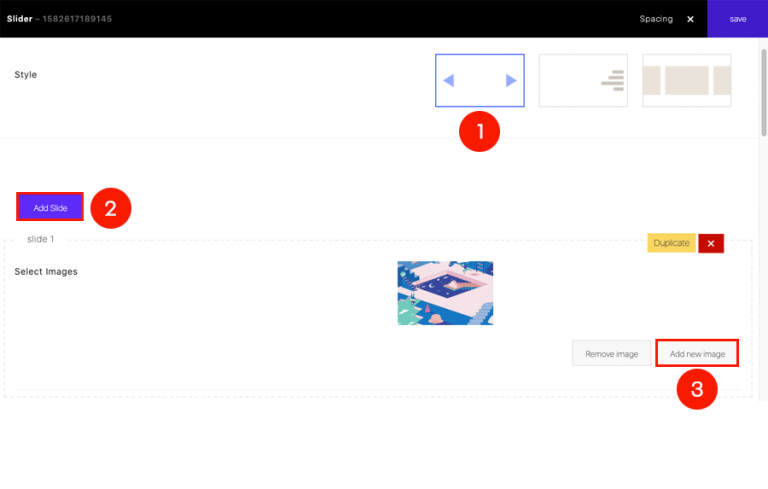
You can add a new Slider module on a page or portfolio post, refer this link – how to create slider– Select the 1st of Style, click Add Slide, click Add new image upload image the current slide. Please keep on click Add Slide to add new slide item.
– If you do not want the title, disable it
– You can custom the mouse arrow via activating “Custom Mouse Cursor”, please upload 2 arrow files(PNG format, the width/height should be less than 128px), check screenshot
– If you do want to add a link on a slider item, the “Enable link” should be off
Regards!
SeaTheme – FAQs – WordPress Customization – FacebookFebruary 5, 2024 at 8:59 pm #30455Hey,
Thank you for your help. I already got this tipps, but its not exactly what i want. I still have the problem that the arrows are shown just on the side of the images. I would like to have the arrow already on the image. like the example here:
https://gustav-duesing.com/projects/the-informal-studio-3/Also i still have the problem, that one the image is the arrow shown as hand. i can not enable this. Also if i click with the hand on the image the site always gos back on the top. I also would like to dont have this!
Thank you and reagards,
Michael
February 6, 2024 at 1:13 am #30457Hi, welcome
Could you please provide your slider webpage URL. I need to understand how you created the slider before I can offer you a solution.
ThanksPlease disable the “Enable link”, it will remove the link area.
Regards!
SeaTheme – FAQs – WordPress Customization – FacebookFebruary 6, 2024 at 8:41 am #30458Hey,
this is the site at the moment:
https://feld7.net/public_wordpress/
The First two Projects Bürohaus Feldstraße and EUROPAN are close to what i want, but still i would like to have the arrow also on the image, like the example i have send you before.regards,
Michael
February 6, 2024 at 9:18 am #30459Thanks,
Please paste the custom CSS code to “Appearance > Customize: Additional CSS”:.slider-arrow { width: 50%; }
Regards!
SeaTheme – FAQs – WordPress Customization – FacebookFebruary 6, 2024 at 11:13 am #30460Great!
Thank you a lot!Regards,
Michael
-
AuthorPosts

 WordPress Customization Service from

- You must be logged in to reply to this topic.