
Home › Forums › ART WordPress Theme › Thumbnail and product image resolution
- This topic has 7 replies, 2 voices, and was last updated 6 years, 5 months ago by
stefanomanca.
-
AuthorPosts
-
May 22, 2020 at 3:48 pm #21355
Hi there!
I’m having some problems with the resolution of my shop…both product image and thumbs looks bad like there is a noise effect on them…can you help me to fix this?
Thanks in advance 🙂
May 22, 2020 at 4:05 pm #21356I’d like to have a 1:1 aspect ratio on both product main image and thumbnail
May 23, 2020 at 2:07 am #21357Hi,
Please refer to : https://doc.seatheme.net/theme/art/how-to-set-woocommerce/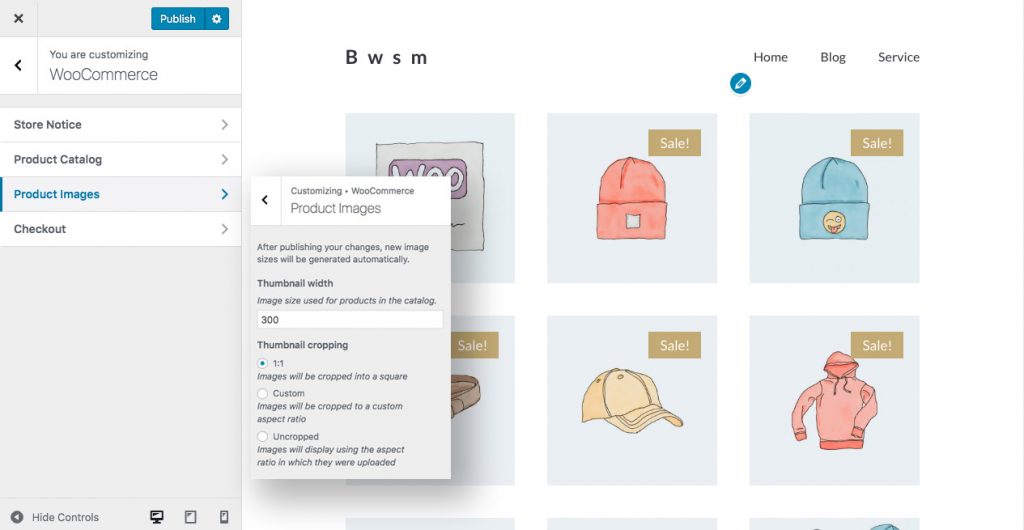
Regards!
SeaTheme – SeaTheme.net – Twitter – Facebook
May 25, 2020 at 6:39 pm #21390I already tried to change the settings on Appearence > Customize > Woocommerce > Product Images and set
Main image width 600×600
Thumbnail cropping 1:1but I still view the thumbnails blurred…
How can I improve this?
Thanks,
Stefano
May 26, 2020 at 3:01 am #21396Hi,
Did you talk about the product images that are in the shop (products list page) or single product page?
Could you please leave the issued webpage URL, thanks!Best
May 26, 2020 at 7:58 am #21398Hi,
I’m talking about the single product page, here is the link of a page https://www.stefanomanca.design/product/cotillo-sunset/
as you can see the thumbnails in the bottom of the main photo have a blur effect and I don’t know how to fix easily without have to change the css.Thanks for your help!
May 27, 2020 at 2:59 am #21409Hi,
Are we talking about the images below the main single product image?
I found this function in their docs: https://docs.woocommerce.com/document/image-sizes-theme-developers/Please go to Appearance>Theme Editor, find Art Theme, find functions.php, add the code before last line
?>:add_filter( 'woocommerce_get_image_size_gallery_thumbnail', function( $size ) { return array( 'width' => 300, 'height' => 300, 'crop' => 0, ); } );Best
May 28, 2020 at 7:41 am #21422Thanks for your help, it works!
-
AuthorPosts

 WordPress Customization Service from
- You must be logged in to reply to this topic.