
Home › Forums › ART WordPress Theme › how to add text under each photo or in between galleries in the portfolio
- This topic has 16 replies, 2 voices, and was last updated 8 years, 3 months ago by
SeaTheme.
-
AuthorPosts
-
June 21, 2018 at 6:45 am #15483
I wish to add text of description on pictures in the portfolio, but seem the customization is very limited?
June 21, 2018 at 7:13 am #15484I will also like to extend my gallery into more pictures, how can i do that please!? thanks a lots
June 21, 2018 at 7:14 am #15485Gallery Layout Builder dont seem to respond, i add layer of galleries but always only one will show
June 22, 2018 at 2:55 am #15504Hi,
Please add text of description for caption of each image: https://www.dropbox.com/s/4ax49adk904vhwt/QQ20180622-105119%402x.jpg?dl=0
I will also like to extend my gallery into more pictures
I don’t understand this question
Gallery Layout Builder dont seem to respond, i add layer of galleries but always only one will show
Did you set images for “Select Images”?
Regards!
Bwsm – uiueux.com – Twitter – FacebookJune 25, 2018 at 3:42 pm #15531what if i just want to caption certain photos in the project page, without having to click open it and see? i assume i need to adjust the spacing and position of the text to do that? and how?
June 26, 2018 at 1:55 am #15536Yes, it has been shown below the image by default(without clicking). If there is not on your page, I could check on your wp-admin.
—–
please send your question and wp-admin(url/user/pass) via
my profile contact form (you need login on ThemeForest), I’ll log in to check it.June 28, 2018 at 7:01 am #15579This reply has been marked as private.June 29, 2018 at 2:23 am #15604Do you need me to check? You didn’t leave URL.
June 29, 2018 at 2:45 am #15606secondmind.hk
June 29, 2018 at 6:48 am #15608I checked, your site running 1.4.0, the caption of single portfolio was added in 2.0
———
Please notice, if you update theme, the old font settings will be removed after updating. You need to reset the font settings in “BM Font management”, read more: https://seatheme.net/forums/topic/art-wordpress-theme-update-log/The BM Content builder would be updated also.
June 29, 2018 at 7:30 am #15609so i need to update to 2.0? and how do i do that?
June 29, 2018 at 8:38 am #15611June 30, 2018 at 3:55 am #15617i have follow everything in this link
https://seatheme.net/forums/topic/update-theme-automatically-by-envato-market-plugin/but stuck at the last step, not sure where i can get the update
https://www.dropbox.com/s/ta475b4qbvpkbei/Screen%20Shot%202018-06-30%20at%2011.53.17%20AM.png?dl=0
thanks
June 30, 2018 at 4:00 am #15618ok i think i update the theme, but the caption still not working, only see it when it click open the picture.
https://www.dropbox.com/s/6zep7awvp8uevws/Screen%20Shot%202018-06-30%20at%2011.58.49%20AM.png?dl=0
thanks
June 30, 2018 at 6:53 am #15621please send your question and wp-admin(url/user/pass) to uiueux@gmail.com, I’ll log in to check it.
July 2, 2018 at 1:06 pm #15643This reply has been marked as private.July 3, 2018 at 2:58 am #15646Please edit single portfolio post, activate “Show Image Caption”, set caption for images:
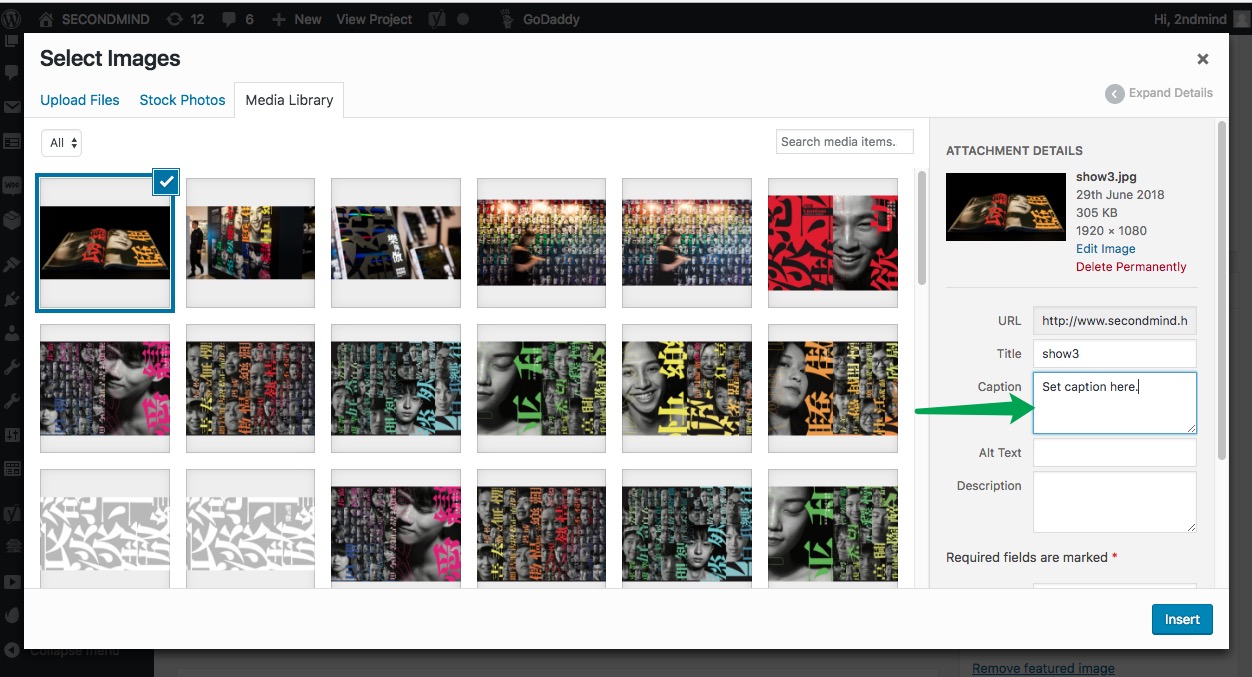
I set last image for “emocolor” : http://www.secondmind.hk/ux-portfolio/emocolor/
-
AuthorPosts

 WordPress Customization Service from


- You must be logged in to reply to this topic.