
Home › Forums › ART WordPress Theme › Diverse issues with Art Theme
- This topic has 8 replies, 2 voices, and was last updated 5 years, 11 months ago by
rubberduckbe.
-
AuthorPosts
-
November 6, 2020 at 9:55 am #22945
Hello,
I’m making a website/Webshop for an artist ‘theheadlessguy.com’ and it’s the first time i’m working with Art Theme, normally i’m working with bigger themes and find my way better than now.
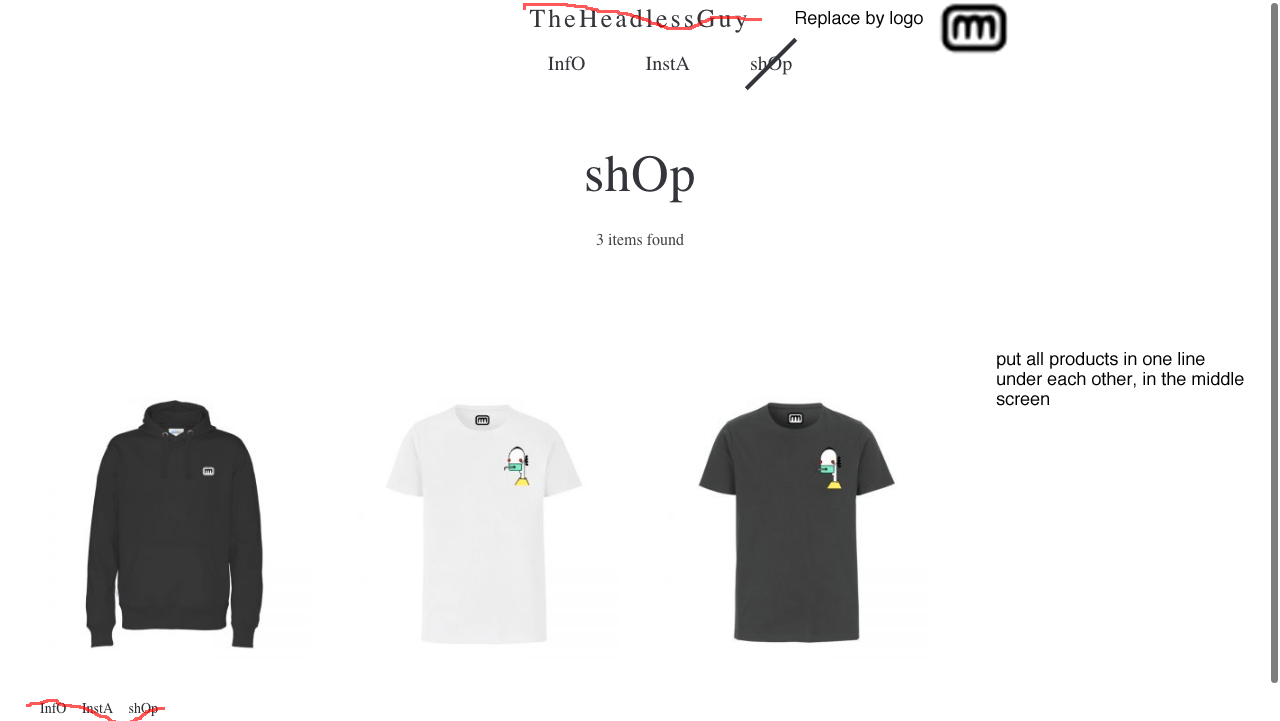
So I have some questions which i also put on the image whom I’ve posted the url from.
1. I like to delete title ‘theheadlessguy’ on the shop (www.theheadlessguy.com/shop) and replace it by the logo.
2. I’d like to put all shop items in one vertical line.
3. Where can I replace the menu left/under this page?
4. And how can I arange distance between logo, menu and the word ‘shOp’ here?Thnx in advance!
Yves Goris
November 7, 2020 at 2:10 am #22953Hi,
1. Please go to: Art Theme > Theme Options > General Settings, turn off “Enable Plain Text Logo”, you will see the image logo uploaders >> https://doc.seatheme.net/theme/art/how-to-set-logo-with-art-wordpress-theme/
2. Do you want to stay the grid item width?3. Please go to Appearance > Menu, refer to
https://doc.seatheme.net/general-topics/how-to-create-wordpress-menu/4. Please go to: Art Theme > Theme Options > Header, enter a number for “Bottom Spacing for Logo”
It is possible to define the spacing above the word “shOp” by custom CSS(“Appearance > Customize: Additional CSS”), like:
@media (min-width: 768px) {
.archive-title.title-wrap { margin-top: 50px; }
}
SeaTheme – SeaTheme.net – Twitter – Facebook
November 7, 2020 at 1:15 pm #22956Hi,
I’m almost there, how can I get the menu on the first page also (www.theheadlessguy.com)?
Thnx for your help, answers inline..
1. Please go to: Art Theme > Theme Options > General Settings, turn off “Enable Plain Text Logo”, you will see the image logo uploaders >> https://doc.seatheme.net/theme/art/how-to-set-logo-with-art-wordpress-theme/
THNX!
2. Do you want to stay the grid item width?
JEP, how can I place them horizontal?
3. Please go to Appearance > Menu, refer to
https://doc.seatheme.net/general-topics/how-to-create-wordpress-menu/THNX!
4. Please go to: Art Theme > Theme Options > Header, enter a number for “Bottom Spacing for Logo”
It is possible to define the spacing above the word “shOp” by custom CSS(“Appearance > Customize: Additional CSS”), like:
@media (min-width: 768px) {
.archive-title.title-wrap { margin-top: 50px; }
}
SeaTheme – SeaTheme.net – Twitter – FacebookNovember 8, 2020 at 2:22 am #22957Hi,
Please edit the homepage, enable “Show header”
1. JEP, how can I place them horizontal?
Do you mean one item per line?
Please paste the custom CSS:.main-list-inn { flex-direction: column; align-items: center; }Regards!
November 10, 2020 at 10:45 am #22972Ok, thnx for clearance.
Maybe my last question.. how can I get the menu on the main page (www.theheadlessguy.com) as on the shop (www.theheadlessguy.com/shop) I mean in the corners? How can I get a responsive menu (tree lines above each other) on the index page?
Thnx in advance!
November 11, 2020 at 1:29 am #22975Hi,
The header is disabled for the main page(www.theheadlessguy.com), please edit the page, enable “Show Header”, the menu will show.
There is only one menu style for the website, it is not possible to set a different menu style for a special page. If you set the corner menu style, all pages will with the corner menu style.
ps: the responsive menu will be shown on the mobile normally.Regards
November 11, 2020 at 8:11 am #22978Strange, I set the menu for http://www.theheadlessguy.com/shop but it isn’t showing on http://www.thehealessguy.com?
Thnx in advance!
November 11, 2020 at 8:12 am #22979*http://www.theheadlessguy.com ?
November 11, 2020 at 8:20 am #22980Sorry, I see it now. Must be sleepy, Thnx for your sollution!
-
AuthorPosts

 WordPress Customization Service from
- You must be logged in to reply to this topic.