
Home › Forums › Arnold WordPress Theme › Cannot edit post/page suddenly after WordPress 5.5 updated
- This topic has 4 replies, 3 voices, and was last updated 6 years ago by
SeaTheme.
-
AuthorPosts
-
August 15, 2020 at 10:39 am #22273
We received some reports about “Cannot edit post/page suddenly”. It is caused the old version BM Shortcodes is not compatible with WordPress 5.5. Please upgrade Arnold theme and BM Shortcodes plugin to fix it. Please backup the website before the update.
There are 2 ways to update the theme and plugin:
1. Using WordPress admin:
- Go to and login themeforest.net, move the mouse cursor to username on top-right of page, there is the sub-menu slide down, click “download” to download the latest version.
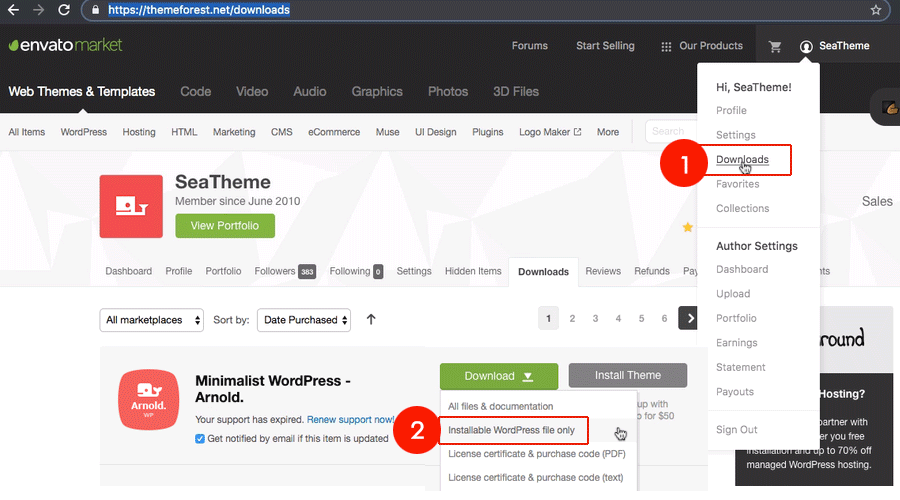
- Login to your WordPress admin.
- In the “Appearance > Themes” menu, please activate another theme.

- Delete the Arnold theme(click “Theme Details” on Arnold thumbnail, there is the popup panel, click “delete” on bottom-right corner)

- At the top of the page click “Add New”

- Click “Upload Theme”, then click the file input to select a file. Select the downloaded theme file, and click “Install Now”.

- After installation you will receive a success message confirming your new install.
- Click the link “Activate”. The Arnold theme is updated.

- Plugin update: Go to Plugins > All Plugins, find the BM Shortcodes, click “Update Required”.
2. Using FTP (If you use Aside theme):
- Go to and login themeforest.net, move the mouse cursor to username on top-right of page, there is the sub-menu slide down, click “download” to download the latest version.
- Extract folder “arnold” from the zipped theme.
- Login to your FTP server and navigate to your WordPress themes directory.
- Normally this would be “wp-content/themes”.
- Upload and replace the folder “arnold” to your themes directory by FTP.
- Click the link “Activate”. The Arnold theme is updated.
- Go to Plugins > All Plugins, find the BM Shortcodes, click the update link.
September 13, 2020 at 5:13 pm #22564Will this get rid of everything I have already done on my website? I do not want to lose current content but I cannot edit new pages.
September 14, 2020 at 1:26 am #22565Hi
The update will NOT get rid of the pages/posts/portfolio/media/theme options.
But I still suggest you make a backup. There are many plugins: https://www.isitwp.com/best-wordpress-backup-plugins-compared/
Best
October 8, 2020 at 4:41 pm #22779Hi, I tried your method but I cannot go further to delete the current Air theme.
When I go to the “Theme Details” I click on it but nothing happens. I tried several browsers with all the same result.
It looks to me as wordpress is the issue. Is there any other way to install the new theme over the old one?I do not use a ftp so I cannot use that method
thanksOctober 9, 2020 at 2:34 am #22785Hi,
May I check your website? Could you please send your question(this topic URL) and wp-admin(URL / username/password) to uiueux@gmail.com ?
(If there is the Jetpack plugin, please disable “Allow users to log in to this site using WordPress.com accounts”)Regards
- Go to and login themeforest.net, move the mouse cursor to username on top-right of page, there is the sub-menu slide down, click “download” to download the latest version.
-
AuthorPosts

 WordPress Customization Service from

- You must be logged in to reply to this topic.