
Home › Forums › ART WordPress Theme › Uploading Two videos
- This topic has 10 replies, 3 voices, and was last updated 8 years, 2 months ago by
SeaTheme.
-
AuthorPosts
-
July 9, 2018 at 6:52 pm #15714
Hi there.
On my project page,
http://sungkwonha.com/ux-portfolio/google-nexus7/I would like to add multiple videos instead of one.
how do I do it?
July 10, 2018 at 3:17 am #15715July 16, 2018 at 12:17 am #15769http://sungkwonha.com/wp-admin/post.php?post=2335&action=edit
check it out.
I did it, and the video multiplies into 4. instead of 2.
July 16, 2018 at 2:58 am #15775Hi, is solved? Good for you.
Do you need me to check the url?? I don’t have access authority.
If need, please send question and wp-admin password to uiueux@gmail.com thanksJuly 16, 2018 at 3:22 pm #15782Yeah. Please check it out.
I don’t know why there is 4 videos instead of 2….
I just put 2 URLs.July 17, 2018 at 3:37 am #15788I mean it’s not solved.
I only put 2 video URLs and
it’s showing 4 videos.It’s weird~!!!! please help me fix this issue!
July 17, 2018 at 8:02 am #15791I am working with the support with it – i thing it is a bug
July 17, 2018 at 4:01 pm #15798Let me know if you happened to fix this issue!
Thanks!
July 17, 2018 at 11:28 pm #15800HI, very sorry, I misunderstood your question.
I checked it again on local, yes it is a repeating bug if you only set Text, will fix in next version.This is a temporary solution:
1) please set 1col for 2nd line(it will be blank):
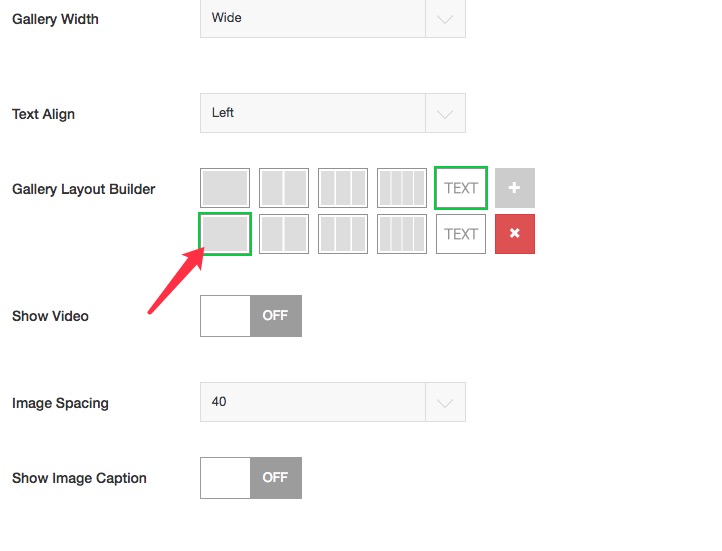
2) there will be a space blow the 2 videos, please remove it by CSS(“Appearance > Customize : Additional CSS”):
.list-layout > .list-layout-col:last-child{display:none;}Regards!
August 13, 2018 at 4:21 am #16078thanks!!
It fixed the video issue. But after that,
an image underneath the video is disappeared.take a look at this post…
http://sungkwonha.com/ux-portfolio/sva-x-aclu-signs-for-a-cause/
There should be an image underneath the video.
But it’s gone…Can you please help me fix this issue?
thanks!
August 13, 2018 at 4:54 am #16079Please remove the CSS from “Appearance > Customize : Additional CSS”:
.list-layout > .list-layout-col:last-child{display:none;} -
AuthorPosts

 WordPress Customization Service from

- You must be logged in to reply to this topic.