
Home › Forums › Arnold WordPress Theme › WP 5.7
- This topic has 11 replies, 2 voices, and was last updated 5 years, 3 months ago by
Anteronilo.
-
AuthorPosts
-
April 12, 2021 at 12:06 pm #24280
Is the Arnold Theme compatible with WP 5.7 ?
I have tried twice to updrade but it failed both times with strange behaviour of the site as a result.
After many hour i am now back at normal i THINK….
(Therefore i want to ask – Is there any way for you to just double check that i am bak or if you see any strange behaviour your end???…)Secondly – If Arnold realy is compatible with WP 5.7 – How can i be sure ythat the upgrade will be OK if i do it a third time…?
Thank you in advance…
April 13, 2021 at 1:35 am #24285Hi,
We have tested with 5.7, didn’t find where is wrong.
Our demo site is running WP 5.7
https://theme.seatheme.net/arnold/I have tried twice to updrade but it failed both times with strange behaviour of the site as a result.
What’s the detail of the strange behaviour?
April 13, 2021 at 7:24 am #24288The behaviour i get is missing Images in certain pages and some of the headline H3 is disappearing.
Nothing that you have seen before i guess?April 14, 2021 at 5:53 am #24300April 14, 2021 at 10:04 am #24313Hello – I might be stupid ( 😀 )
So excuse me for asking for clarificationBefore upgrade to WP 5.7 i need to do back up – of course.
Then i Deactivate the BM Page Builder
Then i do the upgrade to WP 5.7
Then Reactivate BM Page builder.Is this the correct flow – and do i miss anything?
(i Am asking as i did it twice and it cased me a lot of struggling )Thanks in advance.
StefanApril 15, 2021 at 1:31 am #24325Hi,
The important thing is to reactivate the 3 plugins after theme is updated: BM Page builder, BM Slider(if you use it currently), BM ShortCodes(if you use it). Maybe you need to update BM Page builder. Please refer to https://doc.seatheme.net/theme/arnold/installation-arnold/reinstall-downgrade-arnold-v-1-existing-user/#updatere-install-version-1-x
It it not necessary to deactivate the plugins manually.Please check other plugins if work(Compatible) with WP5.7 also.
June 27, 2021 at 1:42 pm #25133Hello
I have a question – The site Anteronilo is running…Arnold theme and with
BM Page Builder
BM Shorty Code
BM Slider for Arnold Theme.I want to upgrade to WP 5.7 – but prior to that i want to upgrade all those BM Plug ins (if necessary9
But i am really surprised how difficult it is to find the list of lates Plug ins (And downloads)) for those
(Same goes for the Arnold Theme it self)Can you send some useful links to the correct place wher download can be made?
Thank you in advance…June 28, 2021 at 2:19 am #25137Hi,
1. It is not necessary to download the plugins manually. Please check if Arnold WP theme is version 1.8.6.1. If it is not , please update theme(how to) firstly.
There is updating links (Update Required) in the WP-admin > Plugins > All plugins, if there is not the links, it means it is the latest version. https://www.dropbox.com/s/poz47k1n24n6kru/QQ20210628-100910.jpg?dl=02. If you want to look for the installable files, please unzip the downloaded file from Themeforest,

unzip it, find /version1(for-existing-users)/arnold-v1.8.6.1.zip, unzip it, you will find the 3 plugin installable files in /functions/plugins/ folderps: Please DO NOT upgrade Arnold WP theme to v2.x
June 28, 2021 at 9:12 am #25139Hello – Followed all instrutions and all went well. It is just one thing i do not understand. It might have to do with the
upgrade ….or not….From a computer, Portrait and Landscape – All good
From a tablet, Portrait and Landscape – All goodBut
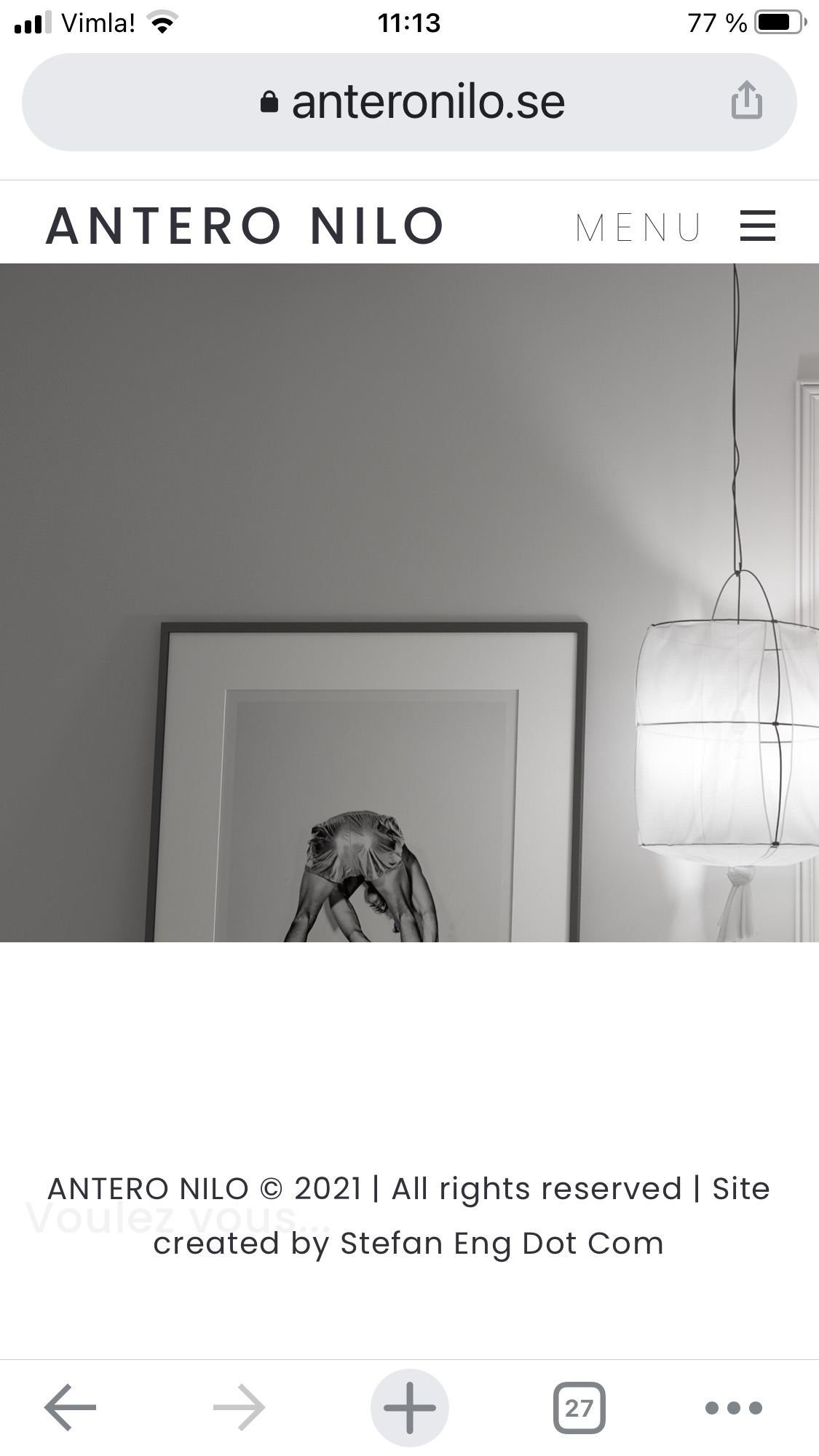
Using a phone Portait is not good whilst Landscape is All goodSomehow there is now a (too) big white area (including footer) even covering some text
I want the image ti bi visible as much as possible – and it was before.
Have tried to change the height but nothing happens when doing it greater – But when doing it smaller it gets narrowerThe problems seems to exist in all iphones at least
If you try a n iphone and an Ipad – you see exactly what i mean.
Any ideas (try send you an image as well)
June 28, 2021 at 9:18 am #25140Here is also an image from my iphione….
https://anteronilo.se/wp-content/uploads/2021/06/Screenshot-2021-06-28-at-11.13.25.jpg
All white should be gone…
The Copyright was earlier very much lower down
and the text that you can see from the actual post (Voulez Vous…) Should be where it is in position but on to pf the image.
Now some how the white area compressed the space for the image….June 29, 2021 at 1:37 am #25141Hi,
1. Add the custom CSS
@media (max-width: 768px) and (orientation: portrait) {
.responsive-ux.single-portfolio-fullwidth .fullscreen-wrap.post-cover  {  height: 70vh; }
}
2. Edit bottom value in the custom CSS: https://www.dropbox.com/s/uld5ahrrbkbp8x2/QQ20210629-093119.jpg?dl=0
June 30, 2021 at 1:06 pm #25147Thanks – Worked perfect!
-
AuthorPosts

 WordPress Customization Service from


- You must be logged in to reply to this topic.