
Home › Forums › ART WordPress Theme › Some issues with theme
- This topic has 13 replies, 3 voices, and was last updated 5 years, 6 months ago by
SeaTheme.
-
AuthorPosts
-
November 12, 2020 at 6:45 pm #22998
Hi,
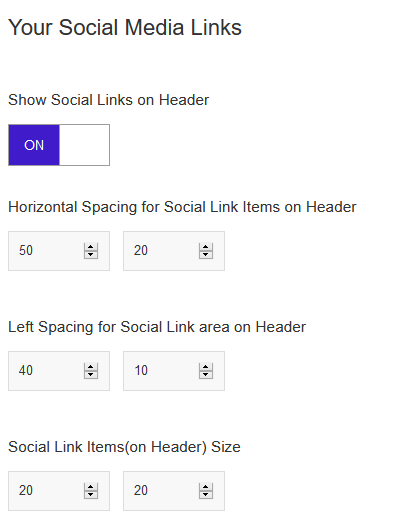
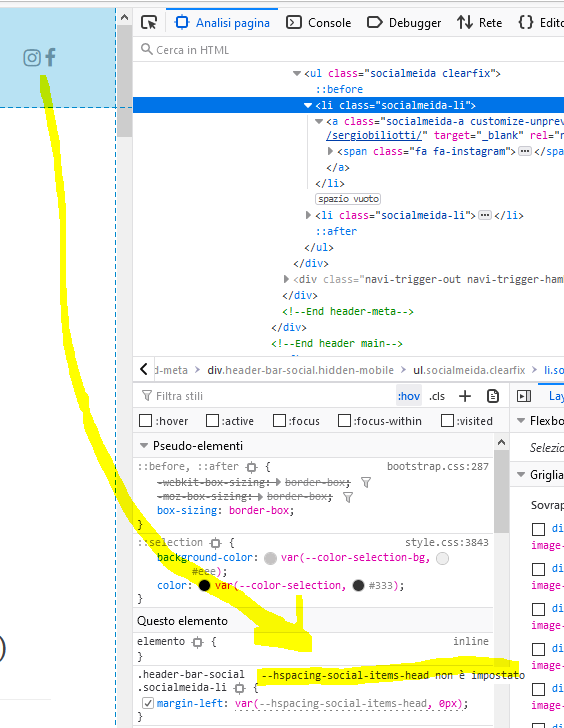
i have some issueses:1)Horizontal Spacing for Social seems not working
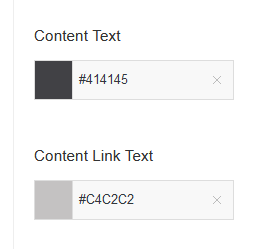
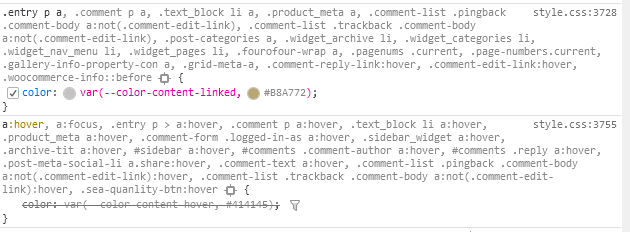
2) Content Link Text mouseover is overrided by NOT hover color
3)how can i show caption under image in lightbox?
ty
November 13, 2020 at 5:44 am #23002Hi,
Thanks for reporting, the issues will be fixed as soon.
Please add the custom CSS(“Appearance > Customize: Additional CSS”) to fix them quickly:
1.body{ --hspacing-social-items-head: 50px; --hspacing-social-items-head-m: 20px }2.
.entry p a:hover {
  color: var(--color-content-hover, #414145);
}
3. Please refer to https://doc.seatheme.net/theme/art/lightbox-options-of-art-theme/#lightbox-caption
Regards!
SeaTheme – SeaTheme.net – Twitter – Facebook
November 16, 2020 at 10:32 am #23036how can i reproduce this carousel?
https://art.seatheme.net/projects/owl-carousel-wordpress-theme/
ty
November 16, 2020 at 2:36 pm #23037Is it possibile to have different column for different layout? I mean in desktop mode for example two columns “col-4” “col-8” that become col-12 col-12 in mobile.
ty
November 17, 2020 at 5:14 am #23039Hi,
Please insert template:https://doc.seatheme.net/sea-content-builder-plugin/template/#insert-template
https://www.dropbox.com/s/t5izj2bwshnzsud/qq20201117-130832.jpg?dl=0Could you give me more tips?
Any col(like col-8, col-4 … ) width will be col-12 in the mobile by default.Regards!
November 17, 2020 at 9:03 am #23043Hi,
i’ve inserted that template, perfect.Just one more thing, in “owl carousel demo” mouse pointer is left/right arrow, in my site is default cursor. I liked much the arrows, how can i set it?
2)
i have this scenario
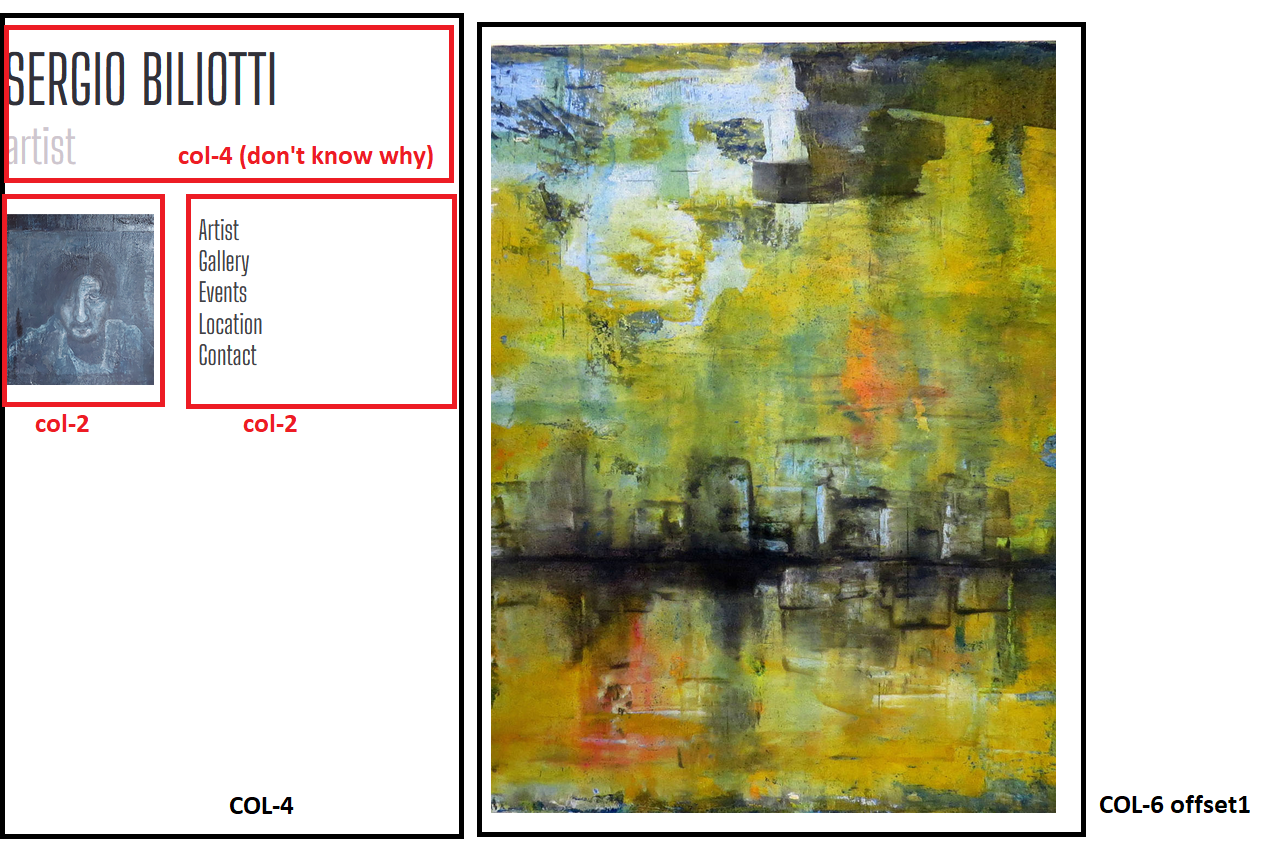
that become this in mobile
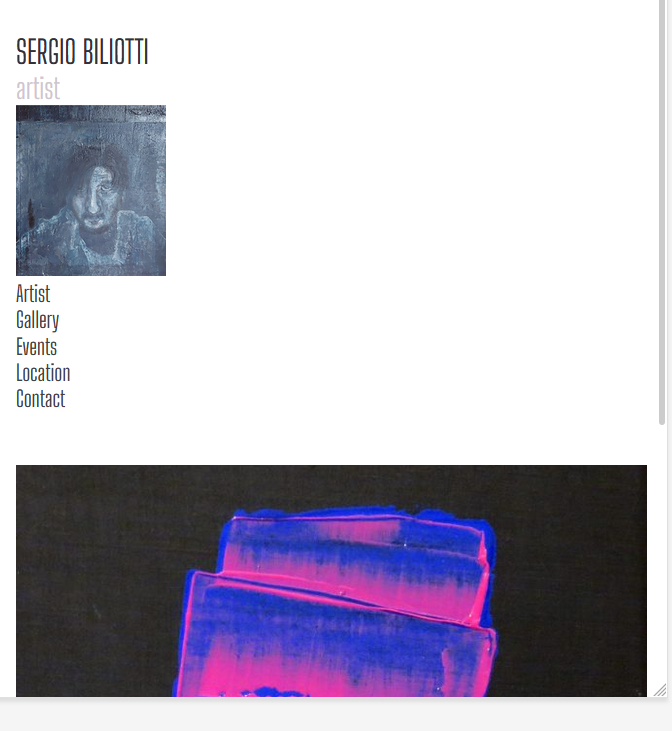
I don’t like it, i prefer to have menu next to image and below the image. Is it possibile?
Ty
November 17, 2020 at 10:25 am #23044I have another problem, i’m your nightmare.
I have to insert in a footer-> text element this code
<a href="https://www.iubenda.com/privacy-policy/95098064" title="Privacy Policy ">Privacy Policy</a><script type="text/javascript">(function (w,d) {var loader = function () {var s = d.createElement("script"), tag = d.getElementsByTagName("script")[0]; s.src="https://cdn.iubenda.com/iubenda.js"; tag.parentNode.insertBefore(s,tag);}; if(w.addEventListener){w.addEventListener("load", loader, false);}else if(w.attachEvent){w.attachEvent("onload", loader);}else{w.onload = loader;}})(window, document);</script>but it doesn’t interpret HTML.
ty
November 18, 2020 at 1:18 am #23045Hi,
1. Please read https://doc.seatheme.net/sea-content-builder-plugin/slider-module/
search Custom Mouse Cursor2. There are 2 options in the Group module: “Hide for Desktop” “Hide for Mobile”. https://doc.seatheme.net/sea-content-builder-plugin/group-module/#hide-for-desktop-mobile
I think you should use the Group modules. You could enable “Hide for Mobile” for the existed Group modules, they will not show in the mobile. You could create a new layout(with new Group modules enabled “Hide for Desktop”) for the mobile.
3. It supports simple HTML codes only, it doesn’t support JS codes, it is not safe.
Please only paste the HTML codes to the footer element:
<a href=https://www.iubenda.com/privacy-policy/95098064 title=Privacy Policy >Privacy Policy</a>
Please enter the javascript codes by a 3rd plugin – Simple Custom CSS and JS( https://doc.seatheme.net/general-topics/how-to-custom-a-wordpress-theme/#javascript-codes ):
(function (w,d) {var loader = function () {var s = d.createElement("script"), tag = d.getElementsByTagName("script")[0]; s.src="https://cdn.iubenda.com/iubenda.js"; tag.parentNode.insertBefore(s,tag);}; if(w.addEventListener){w.addEventListener("load", loader, false);}else if(w.attachEvent){w.attachEvent("onload", loader);}else{w.onload = loader;}})(window, document);Regards!
March 30, 2021 at 1:19 pm #24176Hello I have the same issue and I did what you suggested (using template Slider B) but the Arrows are not there ! instead I have the rounded colored mouse cursor. I don’t know where those arrows are in the theme ? I imported one of the demos but I can’t import the other ones now and the arrows are not in the media library like in your tutorial : https://doc.seatheme.net/sea-content-builder-plugin/how-to-create-a-slider-step-by-step/
March 30, 2021 at 2:03 pm #24178Hi,
Please click “BM Content Builder”, add a new Slider module or edit the existed Slider module,
Check the screenshot to upload the arrow images: https://www.dropbox.com/s/h2zfjeieosppd39/qq20210330-220239.jpg?dl=0
March 30, 2021 at 3:49 pm #24181Thanks but where are those arrows ??? I have no JPGs or PNG in the zip of the theme.. And they’re not in the imported demo.
March 31, 2021 at 6:46 am #24187March 31, 2021 at 7:55 am #24188Thanks a lot. That not the same arrows that the one here : https://art.seatheme.net/projects/owl-carousel-wordpress-theme/
But nevermind, I downloaded the SVG from your code. I find it’s a shame that these arrows are not included in the theme package.Another question : on this tutorial https://doc.seatheme.net/sea-content-builder-plugin/slider-module/, you mention the “Custom Mouse Cursor” but when creating the slider I don’t have this option… Where is it now please ?
ThanksMarch 31, 2021 at 2:49 pm #24189Hi,
Which type of slider you use? (check the image below)

There is not the “Custom Mouse Cursor” in the 2nd type.If you can not see the option on this screenshot ( https://www.dropbox.com/s/h2zfjeieosppd39/qq20210330-220239.jpg?dl=0 ) in the 1st or 3rd type of Slider module, , may I check your website? Could you please send your question(this topic URL) and wp-admin(URL / username/password) to seatheme.net@gmail.com ?
(If there is the Jetpack plugin, please disable “Allow users to log in to this site using WordPress.com accounts”)
ps: I will split this topic, move your question to a new topic “Slider(BM content builder) arrow question”
-
AuthorPosts

 WordPress Customization Service from


- You must be logged in to reply to this topic.