
Home › Forums › Arnold WordPress Theme › Change URL and color of ABOUT and CONTACT
- This topic has 12 replies, 2 voices, and was last updated 8 years ago by
Creatrice.
-
AuthorPosts
-
July 11, 2018 at 10:30 am #15733
Hi Support Team,
I’m currently adupting the ARNOLD DEMO 1 to the needs of my customer.
How can I change the URL and Highlight Color of the 2 items ABOUT and CONTACT on the HOMEPAGE (Landing page)? In terms of the color I changed already the color in APPEARANCE // THEME OPTIONS // COLORS // Select a predefined color scheme and Highlight Color.
I do not understand the idea behind your general programming here: How can I get an item just showing a caption with link beside all the picture / gallery items?
And another thing I’de like to have: Is it possibel to load a 2nd picture instead of the title and the catagory of a picture while hovering over it?
Looking forward to your help and best regards!
July 12, 2018 at 1:43 am #15738Hi,
Please go to Posts > All posts, edit the 2 posts: link to contact and link to about. You will find the color option. If you don’t want to show “Contact” and “About”, you could remove the 2 posts.
It is not possible to hover show 2nd image in Arnold theme, there is the feature in Art theme.
Regards!
July 12, 2018 at 5:01 pm #15743Hi,
thank you very much for the quick response!
In temrs of hovering a 2nd image no problem, I’ll find a workaround. I will check also the Art theme for future projects.
I like Arnold a lot, it’s really a cool theme.
Alle the best!
July 13, 2018 at 1:23 am #15744Welcome 🙂
July 17, 2018 at 6:54 am #15790Dear Support Team,
I have an urgent request:
I use the landing page as a gallery with the settings “Standard Grid Portfolio” with the Category “Uncategorized (10)” – 8 projects and 1 x “link to about” and “1 x link to contact”. I have deliberately chosen the category “Uncategorized” as “Parent” for all subcategories, because only the corresponding subcategory should be seen for each of the 8 items.
There is another page PROJECTS where I only want to show the 8 projects, but not ABOUT and CONATCT. How do I get ABOUT and CONTACT excluded despite using the category “Uncategorized (10)”?
Is there perhaps a corresponding code for Customer CSS with which the two itmes ABOUT and CONTACT can be excluded on the PROJECTS page? Or another way to display only the subcategories?
Many thanks in advance and best regards!
July 18, 2018 at 1:18 am #15804Hi,
Please create a category like “all project”, put all 8 projects into “all project”. You pickup the “all project” category for PROJECTS page.
There is not perfect custom CSS solution.
Regards!<br>
Bwsm – uiueux.com – Twitter – FacebookJuly 19, 2018 at 9:41 am #15815Hi,
thank you very much for your response.
If I create a category like “all projects” and drag all 8 projects into it, the category “all projects” is displayed for all 8 projects, or if I use the projects as parent of “all projects”, no category is displayed at all. But I bare both: The project name and its corresponding category (there are 5 categories as a parent of “uncategorized”). Is there no sensible solution here or is it possible that I do not understand the concept of categories correctly either?
Thanks agian for your help in advance!
July 20, 2018 at 2:51 am #15820If I create a category like “all projects” and drag all 8 projects into it, the category “all projects” is displayed for all 8 projects, or if I use the projects as parent of “all projects”, no category is displayed at all.
Did you talk the filer? I think you don’t want the filer on landing page, do you?
You should put the “all projects” category as parent category for all subcategories. Don’t set the “Uncategorized” as “Parent” for all subcategories, your category will be like:
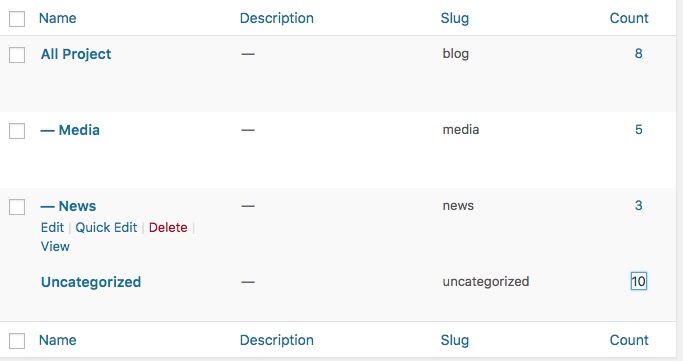
 August 2, 2018 at 8:56 pm #15988
Thank you for the answer.
The solution you suggested does not work, because it is only possible under UNCATEGORIZED to display only one category (for example the category LOGODESIGN as parent of UNCATEGORIZED). Each other category is then displayed together with the parent category (for example ALL PROJECTS together with LOGODESIGN). And that’s not really useful. But no matter, we decided not to show any categories and now only use the headings of the product items.
We are now about to release the website, and have three more points where we need your help:
1. it is possible to display an overview of all projects in a product item by pressing the plus sign between PREV and NEXT. In this overview, the product designations are left-justified and not in the middle. Is there a way to display the names in the middle?
2. If “Image + Text” is selected under Item style, the text is shown below the image. Is there a way to reduce the distance between the text and the image?
3. is there a way to display the title in bold in the posts (product times)?
Thanks in advance and best regards!
August 3, 2018 at 1:42 am #15989Hi, welcome
1. did you mean the each gird item is thumb+title+overview shown by clicked plus button? There is not overview option, it is possible to center title by css – “Appearance > Customize : Additional CSS”:
.ajaxed-grid-item .grid-item-con-text {
    text-align: center;
}
2. Which template? Custom grid? Better leave a page URL.
3. Single gallery post?
You can set post title font here: Appearance > Theme Options > Font setting: Posts & Pages / Title
note: there is not all google font with bold style.October 1, 2018 at 8:52 pm #16592Hi,
I have set “Standard Grid Portfolio” on the start page. I want to insert a picture under the header in the “Intro Section”. This works with the “Classic Editor”, but not with the “Page Builder”. With the “Page Builder” the picture appears in the footer or under the Portfilio items. I have to insert the picture with the “Page Builder”, because it should be resonsive (Smartphone, Tablet).
Many thanks in advance!
October 2, 2018 at 3:44 am #16594Hi,
Please refer this post: https://seatheme.net/forums/topic/how-to-place-pagebuilder-modules-above-the-portfolio/#post-12323
Regards!
October 3, 2018 at 7:42 pm #16617Hi,
it works perfectly, thanks a lot!
Kind regards
-
AuthorPosts

 WordPress Customization Service from
- The topic ‘Change URL and color of ABOUT and CONTACT’ is closed to new replies.